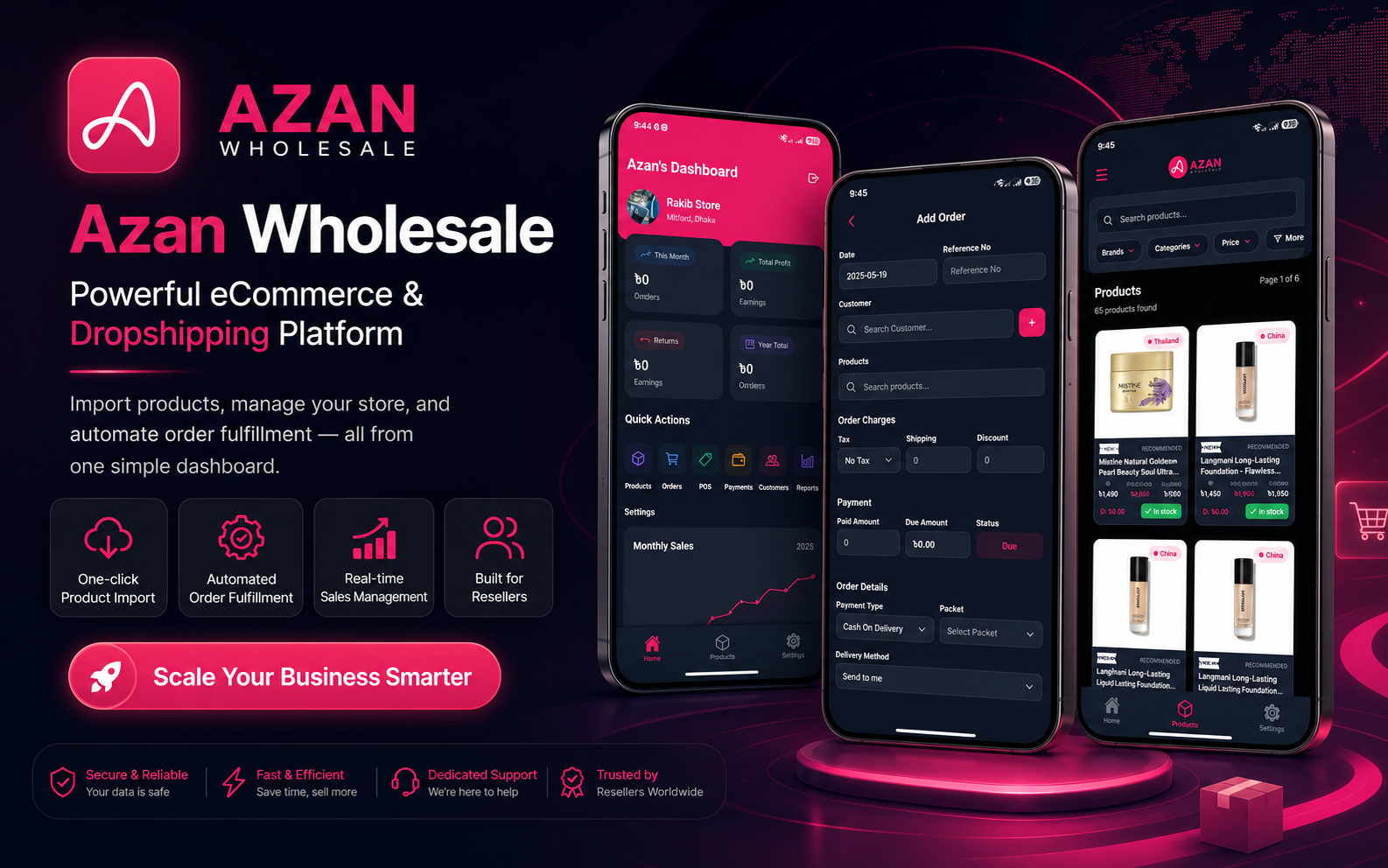
I successfully designed, developed, tested, and launched the Azan Wholesale Android application on the Google Play Store. This project was not only about converting an existing website into a mobile application — it was about understanding how our users run their businesses, identifying where the existing experience was failing them, and building a more convenient product around their daily behavior.
Understanding the Real User Problem
Before developing the mobile application, I had already worked on the Azan Wholesale web platform and reseller panel. I knew the system closely because I had designed and implemented many of its interfaces and features. I understood how resellers created their stores, explored products, managed orders, checked their sales, and operated their businesses.
From a technical perspective, the web application was functional. It had the required features, and users could access the platform from both desktop and mobile browsers. But from a product perspective, I noticed an important problem.
Most of our resellers were not traditional desktop users. Many of them were running their businesses through Facebook pages, Facebook Marketplace, Messenger, WhatsApp, and other mobile-first platforms. Their entire business workflow was happening on their phones.
They were communicating with customers through mobile applications, posting products from their phones, receiving orders through social media, and checking business updates while moving from one place to another. However, when they needed to manage their Azan Wholesale reseller account, they had to open a browser, navigate through the web interface, and perform their tasks inside a mobile browser.
Even though the website was responsive, the experience was not the same as using a dedicated mobile application. Users could accidentally close the browser tab. Their sessions could be interrupted. Navigation required more effort, and the platform did not feel like a permanent part of their daily business tools.
I realized that the problem was not the availability of features. The problem was accessibility, convenience, and user behavior. As a Product Engineer, I believe that a product should fit naturally into the user's existing workflow. Since our resellers were already conducting most of their business activities through mobile applications, Azan Wholesale also needed to become a mobile-first product.
A product should fit naturally into the user's existing workflow. Users should not have to change their habits just to use a platform.
Deciding to Build with React Native
My strongest development experience was in React, Next.js, TypeScript, API integration, and frontend architecture. Before this project, most of my professional work focused on web applications — responsive interfaces, complex dashboards, e-commerce platforms, user authentication systems, search experiences, checkout flows, and reusable component systems.
React Native was the natural choice. It allowed me to continue working with concepts I already understood — components, props, state management, hooks, reusable UI architecture, API calls, conditional rendering, and TypeScript.
However, I quickly learned that knowing React does not automatically mean knowing mobile application development. React Native reduced the learning barrier, but mobile development introduced an entirely different set of problems.
On the web, I worked with URLs, browser navigation, responsive breakpoints, cookies, browser storage, and HTML elements. In React Native, I had to think about screen stacks, application lifecycle, native permissions, secure token storage, device dimensions, Android builds, application signing, release versions, and Play Store requirements.
The programming mindset was familiar, but the environment was different. This project became both a product development journey and a major technical learning experience.
Turning Existing Knowledge into a Mobile Experience
One of my biggest advantages was that I already understood the Azan Wholesale ecosystem. I did not need to start by discovering what every feature was supposed to do. I had previously worked on the reseller web platform, so I understood the business logic, APIs, user roles, feature relationships, and common reseller workflows.
However, I did not simply copy the web interface and place it inside a mobile application. A mobile product requires different decisions.
On a desktop dashboard, users can see navigation menus, tables, cards, filters, statistics, and multiple actions on the same screen. On mobile, the screen is smaller, users often operate with one hand, internet quality can be inconsistent, and every additional interaction creates friction.
I had to identify what information was most important on each screen and what action the user was most likely to perform next. I simplified layouts, reorganized content, increased touch-friendly spacing, improved button placement, and designed navigation around the reseller's most common activities.
Instead of trying to display everything at once, I focused on creating clear paths between tasks. The application needed to feel simple even though the system behind it contained complex business operations.
Designing and Developing the Screens
Because I understood the existing platform, I was able to plan the application's screens based on real reseller workflows. I designed and developed the application screen by screen — authentication, store information, approval status, product browsing, product details, order-related activities, invoices, account information, and other reseller operations.
I built reusable components instead of creating every interface independently. Buttons, input fields, cards, loading indicators, status badges, empty states, error messages, product elements, and navigation patterns were designed to remain consistent throughout the application.
I also paid close attention to loading and error states. In a real application, API data does not always appear instantly. Internet connections may be slow, authentication tokens may expire, servers may return errors, or users may not have any data yet.
A good product cannot only look correct when everything works perfectly. It must also communicate clearly when data is loading, when something fails, when the user needs to take action, and when there is nothing to display.
Connecting the Backend and Building for Real Users
The application needed to communicate with the same backend ecosystem that supported the web platform — integrating authentication, user data, store information, products, orders, sales information, and other reseller operations through APIs.
On the web, browser cookies and sessions can handle many authentication tasks. In a mobile application, I needed to manage tokens and user sessions carefully so users would not have to log in every time they opened the application. I implemented persistent authentication and created logic for handling expired or invalid sessions.
I also created a centralized API structure so that requests, authentication headers, errors, and responses could be managed consistently. This made the application more stable and reduced the amount of repeated code across different screens.
During development, I continuously tried to think from the reseller's perspective. A newly registered reseller might not have an approved store yet. Another user might have created a store but still be waiting for approval. Some users might have orders, while others might not have received their first order. These users should not all see the same generic interface.
I added conditional states based on user and store information. The interface could guide users when an action was required, show the latest approval status, or display meaningful empty states when no data was available.
A feature is not complete simply because the API has been connected. A feature is complete when users understand what is happening, what the information means, and what they should do next.
Testing the Application
Testing a mobile application is different from checking a responsive website in a browser. I needed to test different screen sizes, Android versions, navigation paths, authentication states, slow API responses, empty data, incorrect input, interrupted sessions, and real-device behavior.
Some interfaces looked correct on one device but needed adjustment on another. Keyboard behavior also required attention — when users entered information, the keyboard could cover input fields or action buttons. I had to make sure forms remained usable when the keyboard was open.
I also tested how users moved backward and forward through the application. Incorrect navigation behavior can easily confuse users or create duplicate screens inside the navigation stack.
Testing revealed small issues that were easy to miss during development — inconsistent spacing, loading states that ended too early, buttons that needed better disabled states, API errors that were not communicated clearly, and screens that required additional fallbacks. Every testing cycle improved both the stability and usability of the application.
The Deployment Journey
After completing development and testing, I entered the most challenging stage: publishing the application on Google Play. Mobile application deployment introduced a completely different process from web deployment.
I needed to configure the Android package identifier, generate production builds, manage version codes, prepare signed application bundles, create the Play Console listing, complete policy declarations, upload screenshots, provide privacy information, and manage different testing and release tracks.
Publishing the application was not as simple as uploading the production file and clicking a release button. The application needed to go through Google Play's testing process. I created testing releases, added testers, shared installation links, monitored access, and made sure the application was being used during the required testing period.
I also had to understand how the application handled user data and accurately communicate that information to Google Play. The Data Safety section requires developers to explain which types of information the application collects or shares and how that information is protected.
I also encountered warnings and configuration questions related to Android permissions and advertising identifiers. Even when an application does not intentionally use advertising features, third-party dependencies can introduce permissions into the final Android build. I had to inspect the configuration, review dependencies, and make sure the Play Console declarations matched the actual application behavior.
Handling a Rejected Release
One of the most stressful moments in the journey was when the application submission was rejected because the review team could not access the application with the provided credentials.
From my side, the application was working. But from the reviewer's perspective, they could not enter the product and verify its functionality. This experience taught me an important product and deployment lesson: a product is not ready for review only because it works for the development team. The reviewer must also be able to access it without confusion.
I reviewed the credentials, tested the account again, checked the login flow, updated the necessary information, and prepared a clearer explanation for the review team. I also submitted an appeal and communicated the situation properly.
Waiting for the result was difficult because the technical development was already complete, but the application still could not reach users. However, instead of treating the rejection as a failure, I treated it as another issue that needed to be investigated and resolved. That mindset helped me remain focused.
Instead of treating the rejection as a failure, I treated it as another issue that needed to be investigated and resolved.
My Role as a Product Engineer
My contribution to this project was not limited to frontend development. I identified the user-experience problem, proposed the mobile solution, selected the technology, planned the application structure, designed the screens, developed the interfaces, integrated the APIs, handled authentication, tested the application, prepared store assets, managed Play Console requirements, responded to review issues, and completed the production release.
During this project, I needed to move continuously between different perspectives. As a developer, I focused on architecture, code quality, API integration, and performance. As a designer, I focused on navigation, hierarchy, spacing, mobile interactions, and usability. As a product thinker, I focused on reseller behavior, business workflows, adoption barriers, and user value. As a release owner, I focused on testing, policy compliance, production builds, store presentation, and communication with the review team.
This project represents what being a Product Engineer means to me. A Product Engineer does not only wait for a finalized design and a list of development tasks. A Product Engineer observes users, understands the business, identifies problems, proposes practical solutions, makes technical decisions, and remains responsible until the solution reaches real users.
What I Learned
The biggest lesson I learned is that user behavior should guide product decisions. The web application already existed, but that did not mean the user experience was complete. Our users were mobile-first business owners. Building a dedicated mobile application brought the product closer to the way they already worked.
I also learned that previous technical experience can provide a strong foundation, but entering a new platform still requires humility. My React and Next.js experience helped me understand component architecture and application state, but I still had to learn the rules of mobile development.
Another lesson was that deployment is part of product engineering. Preparing a build, passing a review, handling policies, providing reviewer access, and creating store assets are not separate from the product. They are part of delivering it.
I also learned to treat rejection as feedback rather than defeat. When the application was rejected, the right response was not frustration. The right response was to understand the reviewer's problem and remove the barrier.
Finally, I learned that ownership creates growth. Because I handled the project from problem identification to production launch, I gained experience in areas that I would not have learned by working on only one isolated feature.
Building the Azan Wholesale Android application was not simply an attempt to learn React Native. It started with a real product problem — our resellers were operating mobile-first businesses, but our platform was asking them to depend on a browser-based workflow. The journey included architecture decisions, UI design, API integration, authentication, testing, Android configuration, rejected submissions, Play Console policies, and multiple release challenges. But every challenge improved both the application and my understanding of product development. The most valuable result is that I learned how to take ownership of a product from identifying a user problem to delivering a working solution into the hands of real users.